Guiding Gingko · October 2026
What does ChatGPT say about your university?
Now you decide from the editor what content AI reads: llms.txt, each page's Markdown version, and Griddo AX Docs' MCP already connected with one click.
NEW
IA Content Discovery.
Everything Griddo does so AI can find, understand and cite your university.
More and more university searches now start with a question to an AI assistant, and those assistants cite the content they can read well. Being the source they cite is the new positioning.
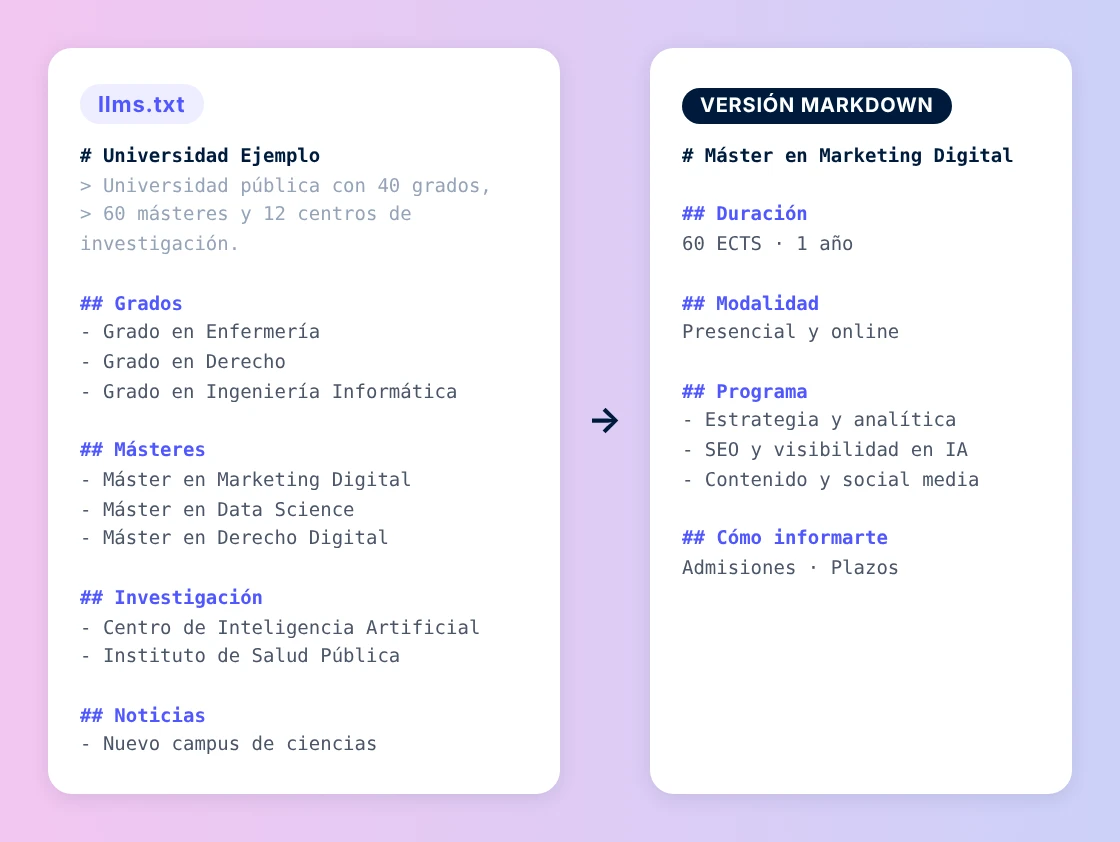
llms.txt is the index models consult to understand what's on your site, and now your team defines and manages it from the editor. Alongside the HTML, Griddo also publishes a Markdown version of every page, the format models read best.
- An llms.txt you manage: you define it from the editor, and Griddo keeps it up to date with every publish
- A Markdown version of every page: the full text, with no styles or code, and links to the rest of the pages
- Link Headers and Markdown Negotiation: pages and the CDN automatically redirect every agent to the version it understands best
Your llms.txt, exactly how you want it.
llms.txt and the Markdown version are now managed from SEO Settings, in the editor. You define in detail what your llms.txt contains, how it's organized, and what's left out.
- Domain-by-domain activation: decide on which domains to turn on llms.txt and the Markdown version
- Automatic filters by template: choose which pages are included one by one, or with filters by template, site or language
- Organized into sections: degrees, master's programs, research, news, so AI understands your offering
Your llms.txt will be exactly how you decide: you choose what your university tells AI. The documentation walks you through, step by step, how to configure it from the editor.
If you want to go deeper into how a university's visibility in AI search engines is changing, this Journal article gives you the context: How to implement an effective GEO strategy at your university.
AND MORE
Connect your assistant to Griddo's documentation with one click.
Griddo AX Docs' MCP is now in the Claude, Cursor and ChatGPT directories.
In September we introduced Griddo AX Docs' MCP: your AI assistant queries Griddo's real documentation and links to the source page.
Since then we've published it in the Claude, Cursor and ChatGPT directories: you no longer need to follow instructions to add it by hand, just one click from your assistant's directory.
- One click to connect it: from your assistant's directory, no configuration needed
- Always up to date: the MCP updates with every documentation publish
- Open and read-only: no account or password required
Discover everything this release brings.
IA Content Discovery and Griddo AX Docs' MCP now connected with one click. Check out the full Guiding Gingko release notes.
Want to try it?
We'll walk you through activating it on your Griddo
Fill in the form and the Griddo team will get in touch within 24 hours.