MCP by Griddo
Let your AI assistant actually know Griddo — with verifiable sources.
Griddo publishes official MCP (Model Context Protocol) connectors so the AI assistants your team already uses can access real Griddo information, instead of guessing. Every answer cites where it comes from.
An open standard for AI to talk to your systems.
Model Context Protocol (MCP) is an open standard that defines how an AI assistant connects to external data sources and tools through a common interface — instead of a separate integration for every app-and-service combination.
For a university, that means your institutional knowledge can become queryable by AI without relying on the model having seen it during training, or inventing an answer when it hasn't.
Why it matters
Why MCP matters for a university
An open standard, not a bespoke integration
MCP defines a common interface already spoken by Claude, ChatGPT, Copilot and other compatible assistants. You connect once, not a separate integration per tool.
Verifiable sources, not hallucinations
Instead of the model guessing how your university runs on Griddo, the assistant queries the real source and cites the exact page each answer comes from.
Your knowledge, where your team already works
Marketing, communications and IT ask the AI assistant they already use every day, without opening a new tab or learning a different tool.
The technical piece, in one sentence
What an MCP server is (and isn't)
MCP connects three pieces: the host (the AI application you use), the client (manages the connection to each server), and the server (exposes real data or functions through that common interface).
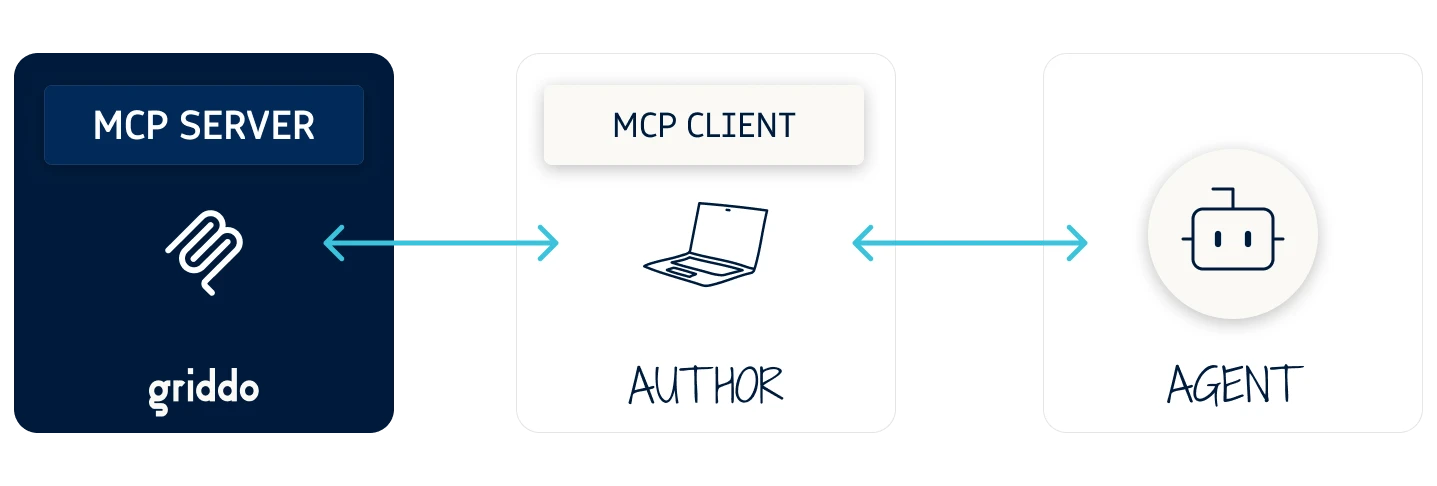
Griddo publishes MCP servers. You install nothing on your own infrastructure: you add the connector URL in your assistant's settings, and the MCP client does the rest.
- Host: the AI application you use every day (Claude, ChatGPT, Copilot, Cursor...)
- Client: maintains the connection to each MCP server you enable
- Server: exposes real data and functions — in this case, the ones Griddo publishes
- Nothing to install: you add the connector URL and the client handles the rest
Available since September 2026
Griddo AX Docs: real-time documentation, in the assistant you already use
Griddo's first MCP connector gives Claude, ChatGPT, Copilot and other compatible assistants access to the official documentation of the Griddo backoffice (Author Experience). Ask the assistant how to do something in Griddo and it answers with what the documentation says, linking the exact page on docs.griddo.io.
Built for marketing, admissions and communications teams — content authors, editors and site administrators, not developers. Developer topics (@griddo/core, schemas, module code, API, SDK) are out of scope for this connector.
See technical documentationSecurity & permissions
What Griddo AX Docs can do — and what it can't
Read-only
Griddo AX Docs doesn't change anything. It searches and reads public pages on docs.griddo.io, nothing else.
No account, no approval step
Set it up by adding the connector URL to the assistant's settings. There's no user, password, or approval step involved.
No access to your account data
The connector only receives the search terms and the paths of the pages it reads — never credentials or editorial content from your own instance.
The connector that actually matters
Griddo DXP MCP: the same access control you already trust, now for your AI too
Griddo DXP MCP automatically respects every permission in Griddo's RBAC: an AI agent run by a user can only see the same content and the same confidential data that user is already authorized to see.
All data exposed through this MCP server respects Griddo's permission and secure access-control model, so LLM access to data is restricted to authorized users only. This keeps AI interactions powered by MCP fully aligned with your compliance and data-privacy requirements.
Talk to the teamWhat's next
Griddo AX Docs is the first connector. Not the only one.
The same MCP infrastructure now extends to your own institution's content.
Griddo AX Docs — available now
In production since September 2026. Reads, searches and cites Griddo's official documentation, in Spanish and English.
Griddo DXP MCP (in development)
A second connector, with RBAC-based access control and OAuth 2.1 with PKCE authorization, for reading and managing an institution's own editorial content — not just public documentation. 1
ASK YOUR AGENT
Research Griddo with your favorite AI
One click opens your assistant with the full context ready
Ask your favorite assistant to research Griddo, see what it finds, and analyze the platform in depth.



Frequently asked questions about MCP
An open standard, not a Griddo-proprietary technology
MCP is an open standard that defines how an AI assistant connects to external data sources and tools through a common interface. Griddo adopts it by publishing its own MCP servers, but the protocol itself isn't Griddo's.
No — it's built for content authors and editors
No. Griddo AX Docs is built for the people who work in Griddo day to day — marketing, admissions, communications — not developers. Setting it up means adding a URL to the assistant's settings.
Any MCP-compatible client
Any assistant with a compatible MCP client — including Claude, ChatGPT, Copilot and Cursor. Full installation instructions are in the technical documentation.
No. Griddo AX Docs is read-only
No. Griddo AX Docs only searches and reads public documentation pages. It has no access to account data or editorial content, and it can't write or change anything.
The connector for your own institution's content, with your same RBAC
It's a second connector, separate from Griddo AX Docs, for reading and managing an institution's own editorial content — not just public documentation. It automatically respects Griddo's RBAC (an agent only sees what the authenticated user is authorized to see) and authorizes through OAuth 2.1 with PKCE. Still in development, with no GA date yet.
In Griddo's documentation
The full connector installation guide, with the exact URL and examples per assistant, is published on docs.griddo.io.
Go to docs.griddo.io →
Activate MCP on your Griddo
Connect your knowledge with AI
Tell us about your institution and we'll explain how Griddo's MCP connector works, and when the content-management one arrives.